Creator protection, without the maze

Found your work posted without permission? Start here.

ProofStrike helps you save the proof, find where to send the complaint, build the notice, and keep track of what happens next.

Nothing is sent until you review and approve it.

ProofStrike workspace
ProofStrike creator protection workspace showing original work, copied links, and next actions
Actual ProofStrike product workspace with demonstration data.
One connected recordWork → proof → contact → notice → result
  1. 01Add your work
  2. 02Save copied links
  3. 03Keep the proof
  4. 04Find the contact
  5. 05Build the notice
  6. 06Track the result

The practical problem

Your work can spread faster than you can chase it.

Links disappear. Contact pages move. Screenshots and replies end up in different folders. ProofStrike gives the work one clear place to live.

01

Save the proof

Keep the copied link, screenshots, dates, and details together.

02

Find the right contact

See the website’s published process and where the contact came from.

03

Build the notice

Follow a guided process instead of starting with a blank legal template.

04

Keep the history

See what you sent, who received it, and what happened afterward.

One connected workflow

From copied link to trackable case.

Start with what you know. ProofStrike keeps each next step connected and leaves every decision with you.

  1. 01

    Add your original work

    Save the work and the creator details that support it.

  2. 02

    Save copied links

    Add the exact pages where your work appears.

  3. 03

    Keep the proof

    Connect dates, screenshots, page details, and history.

  4. 04

    Find the contact

    Review public contact information and where it came from.

  5. 05

    Build and review the notice

    Choose the recipient, check the facts, and approve the final step.

ProofStrike workspace
ProofStrike guided notice workspace connecting an original work, copied link, proof, and recipient
Actual ProofStrike product workspace with demonstration data.

Meet ProofStrike

See one stolen link become a trackable case.

Follow the work from saved proof to a reviewed contact and a notice you control.

ProofStrike case workspace preview
Product tour coming soonThe approved video, captions, and transcript have not been supplied yet.

The protection workspace

Every useful detail stays connected.

Benefits come first. Technical detail stays available when you need to review the source or history.

profile

Creator profiles

Save identity, ownership, and contact details once.

link

Links to remove

Keep copied links organized and ready for review.

scan

Creator protection

Discover and review possible unauthorized uses.

route

Find the contact

See published contacts, sources, and honest uncertainty.

notice

DMCA Wizard

Build the notice one step at a time, then review it.

case

Case Library

Track proof, notices, replies, and outcomes together.

evidence

Evidence Vault

Keep saved proof and history connected to the case.

Creator Protection

Add your original work once.

ProofStrike keeps it connected to copied links and future cases.

  • Save reusable creator and ownership details.
  • Review possible unauthorized uses.
  • Move a confirmed link into a connected case.
Explore creator protection
Illustrated ProofStrike creator protection workspace with original work and monitored copies
Illustrated product story. Actual interfaces may vary.
ProofStrike workspace
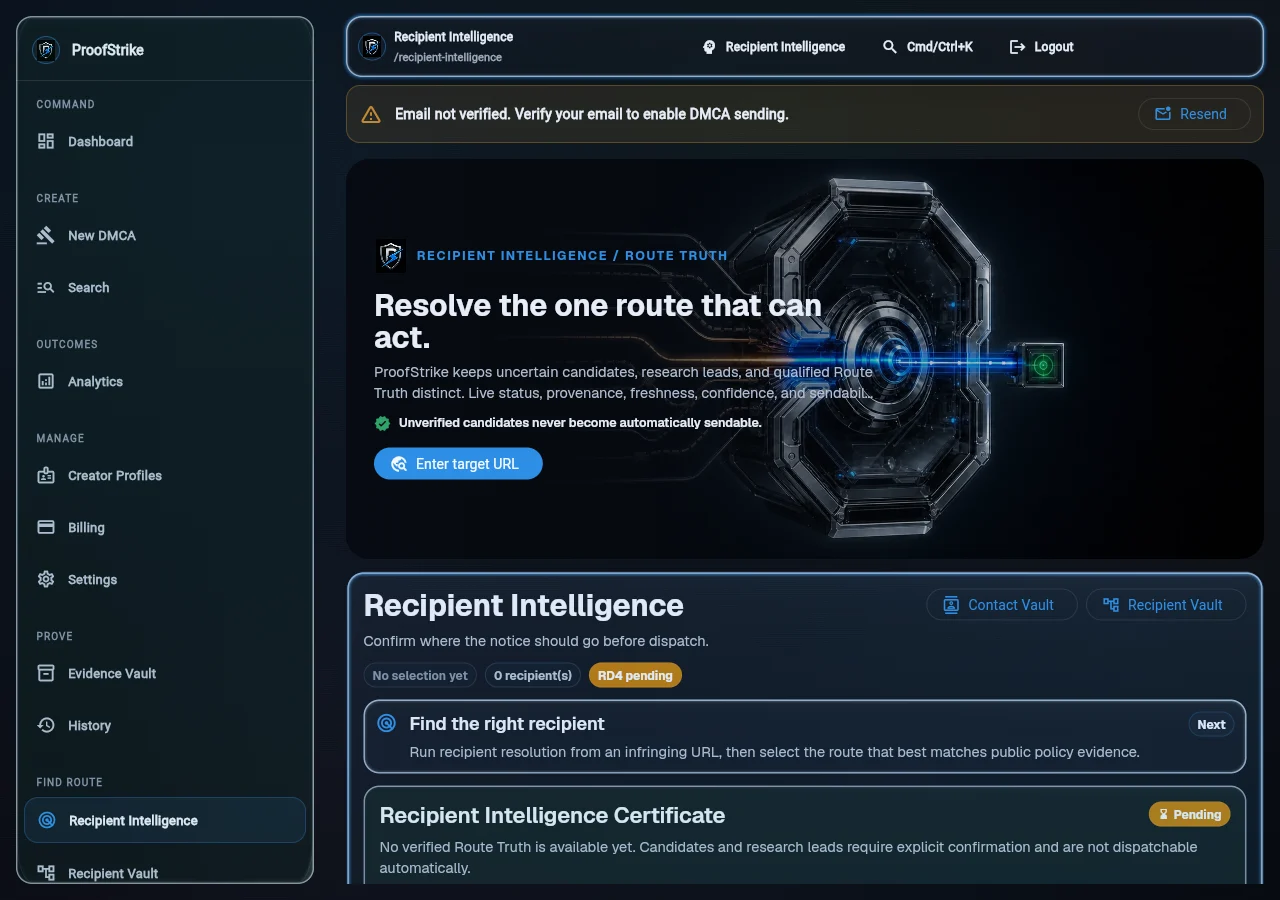
ProofStrike contact research workspace showing the source and review status for a possible recipient
Actual ProofStrike product workspace with demonstration data.

ProofStrike Recipient Intelligence

Find where to send the complaint.

ProofStrike checks the website’s public pages for a copyright email, form, or removal process. It shows what it found and where it found it. You choose the final contact.

Published contact foundReady for your reviewPossible contactA person needs to check thisNo reliable contact found yetYou can still choose a contact yourself
What if the website gives no usable contact?

ProofStrike may show a company that helps run the site, such as its host, CDN, registrar, or network provider. This is not the website’s own contact. The relationship and source stay visible for review.

Saved proof and history

Keep the proof connected to the case.

ProofStrike saves the copied link, source page, date, screenshots, contact information, and notice together.

A digital fingerprint helps show whether a saved file later changed. It supports the record; it does not decide the legal merits.

How ProofStrike handles trust and uncertainty
Illustrated ProofStrike Evidence Vault connecting saved proof to a case
Illustrated product story. Customer evidence stays behind authenticated controls.
Illustrated ProofStrike notice workflow with recipient review before sending
Illustrated product story. Nothing is sent without review.

DMCA Wizard

Build the notice one step at a time.

  1. 1Choose the work
  2. 2Add copied links
  3. 3Review the proof
  4. 4Choose who receives it
  5. 5Review the notice

You may enter a contact directly or ask ProofStrike to research the website’s public contact. You review the source, choose the recipient, and continue to final review.

Built for real creator work

One clear path. Two ways to operate.

For creators

Protect your own work without rebuilding the case every time.

  • Add and organize original work
  • Save copied links
  • Find published contacts
  • Build notices consistently
  • Keep case history
See the creator path

For agencies

Keep each client’s work and review history separate.

  • Separate clients and creators
  • Control team access
  • Preserve client-specific proof
  • Review recipient choices
  • Maintain an audit trail
See the agency path

Trust through clarity

Strong records. Honest uncertainty. Your decision.

You stay in control

ProofStrike can suggest a contact. You choose where the notice goes.

Uncertainty stays visible

If ProofStrike is not sure about a contact or outcome, it says so.

Your records stay connected

The work, copied link, proof, contact, notice, and result stay with the same case.

No false promises

ProofStrike does not promise that every website will respond or remove content.

Read the trust principles

Creator protection for more people

Protection should not belong only to large studios.

ProofStrike is being built for musicians, photographers, models, streamers, educators, filmmakers, digital artists, subscription creators, and independent agencies.

MusiciansPhotographersModelsStreamersEducatorsFilmmakersDigital artistsIndependent agencies

Choose the support that fits

Software, team workflows, or a bounded review.

Managed-enforcement pricing is not shown until founder approval is recorded. You can request a review without committing to an outcome.

For independent creators

Self-service protection

Organize your work, copied links, proof, contacts, notices, and cases in one place.

  • Reusable creator details
  • Guided review
  • Connected case history
Protect my work

For teams

Professional and agency

Keep each creator’s work and proof separate while your team reviews cases consistently.

  • Multiple creators
  • Team access
  • Creator-specific records
Talk to ProofStrike

For difficult sites

Managed enforcement

Request a bounded review of the site, its published contacts, and supportable next steps.

  • One creator and one domain
  • Defined research window
  • No guaranteed outcome
Request an enforcement review

Practical guidance

Answers before marketing.

View all practical guides

Questions creators ask

Clear answers. No buried conditions.

Does ProofStrike guarantee removal?

No. A website or service may remove the material, ask for more information, reject the request, or take no visible action.

What happens when no copyright contact is listed?

ProofStrike can research public pages and possible next contacts. It shows where information came from and when a person still needs to check it.

Does ProofStrike send notices automatically?

No. Nothing is sent until you review and approve it.

Is ProofStrike a law firm?

No. ProofStrike provides software and educational information, not legal representation.

Can I track several links from one site?

Yes. Keep each copied link reviewable while connecting it to the same creator, original work, and case history.

What proof does ProofStrike preserve?

ProofStrike can keep links, page details, dates, screenshots, contact sources, notices, replies, and outcome history connected.

Can ProofStrike help with a difficult site?

You can request a bounded review of the site, its published contacts, and supportable next steps. No response or removal is guaranteed.

What is managed enforcement?

It is a scoped, human-led review for one creator and one domain. It is not legal representation, litigation, or a promise to shut down a website.

Does ProofStrike monitor for new copies?

Creator Protection can support discovery and review of possible unauthorized uses. Every finding still needs human review.

Can agencies manage multiple creators?

Yes. Agency workflows are designed to keep creator records and access separated while preserving review history.

Start with one work and one link

Your work deserves more than a blank template.

Save the proof, find the contact, build the notice, and keep track of what happens next.